An AI quota dashboard should answer a small question: can you keep working, and when does the limit reset? Put Codex, Claude and Grok in one readable Telegram photo instead of opening three account pages.
The starter below includes an English renderer, a static web view and a reusable agent skill . It needs no provider credentials to render the labelled demo. Connecting live account data is a separate step.
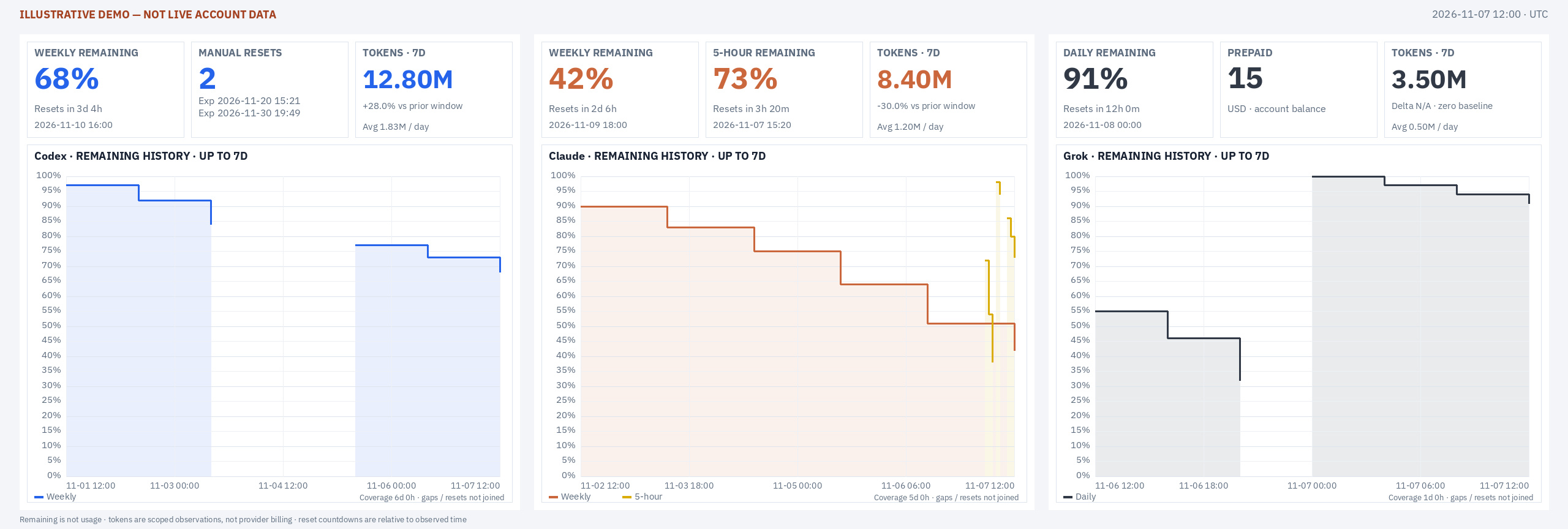
Illustrative demo. No live account data is published.
Run the starter
Download the complete skill bundle , unpack it into a new directory, then run:
cd ai-quota-dashboard
uv run --with Pillow scripts/render.py --input scripts/demo.json --output out
uv run --with Pillow python -m unittest discover -s scripts/tests -p 'test_*.py'
python3 -m http.server 8080 --directory out
- Open the generated
index.htmlthrough the local server. - Inspect the generated photo at its actual size and at phone scale.
- Keep the demo label visible. Its values are illustrative, not account observations.
- To make the workflow available to an agent, put the unpacked skill in its skill directory. For a standard Hermes profile, that is
~/.hermes/skills/.
The bundle includes the renderer, fonts, font license, JSON example and tests. It does not require Grafana, Docker or root access.
Connect authorized data
Keep collection outside the renderer:
Authenticated collectors
        ↓
Account-scoped observations
        ↓
Validated JSON snapshot
        ↓
Shared renderer
        ├── Telegram photo
        └── Static web view
- Read the bundled
scripts/README.mdandscripts/demo.jsonbefore writing an adapter. They define the executable input contract. - Reuse an existing authorized collector or export. Use documented provider interfaces where available; there is no universal quota endpoint promised by this package.
- Keep authentication and account selection in the collector. The renderer should never need cookies, refresh tokens or conversation transcripts.
- Export an allowlist of display fields. Leave emails, account fingerprints, internal hosts and credentials out of public artifacts.
The same boundary applies when an agent builds the integration. Give it the schema and authorized source, not an instruction to hunt for credentials. For a broader check before it writes or publishes, use the agent verification loop .
Keep quota honest
Each provider gets three small cards above its history chart:
| Card | Show | Do not infer |
|---|---|---|
| Quota | Percentage remaining and next reset | A percentage calculated from local tokens |
| Account context | Another quota window, reset credits with expiries, or a prepaid balance | Top-up settings from a balance |
| Local activity | Seven-day token total, comparison and daily average | Account-wide billing from one agent’s sessions |
A local token counter and a subscription limit measure different things. Document which sessions the counter covers and whether cache reads and writes are included. If the previous seven-day total is zero or unavailable, omit the percentage comparison instead of inventing one.
Use explicit reset labels:
Resets in 2d 4h
Resets in 3h 18m
- Include the display timezone for calendar dates.
- Show individual credit expiry dates when the source reports them.
- Render missing values as unavailable, not zero.
- Keep weekly and five-hour windows distinct. They are separate constraints.
Use a rolling seven-day chart, starting at the first trustworthy observation if collection began more recently. Break lines across long sampling gaps and quota-cycle changes. An outage is not observed consumption, and a reset is not an ordinary downward trend.
Render one image
The font comparison in this build looked better than the live /usage image. Selecting the same typeface did not reproduce it.
The original paths used Pillow for cards, browser canvases for some charts and Matplotlib for another. They assigned different sizes and baselines. Enlarged date labels could clip because the chart still reserved space for the old font.
There was another mismatch: the manually sent example was a prepared JPEG, while /usage still returned a larger PNG composite. Sending a good example did not connect its final preparation to the command.
The portable starter removes those differences:
- IBM Plex Sans across cards, titles, axes and legends.
- One rendering engine for the English image.
- A native three-column photo size of 2560 × 864, without resizing already-rasterized text afterward.
- Blue for Codex, orange for Claude and charcoal for Grok. Colors identify sources, not comparable units of quota.
A larger existing web image can still be kept as a lossless source. What matters is that the command returns the deliberately prepared photo, not a different intermediate file.
Test the command
Invoke the actual handler. Inspect the media path it returns. Testing only a renderer or a manually exported image misses the boundary where this installation failed.
| Check | Failure it catches |
|---|---|
| Final media path and file format | Command still returning an intermediate PNG |
| Text bounds at phone scale | Overlaps, clipped dates and unreadable legends |
| History gaps and cycle changes | Lines implying observations that never happened |
| Missing and invalid inputs | Unavailable values silently presented as zero |
| Published HTML and image readback | A page loading while its images fail |
Then test delivery to an authorized chat and the exact topic:
- Send the returned file using
sendPhoto, notsendDocument. - Keep the returned message ID and inspect the available photo sizes.
- Use
getFileto download the largest representation. - Inspect that downloaded image, not just the sharp source on disk.
In this deployment, a quality-95 JPEG with chroma subsampling disabled was returned at 2560 × 864 pixels. That is a measured result from this installation, not a universal Telegram size guarantee. Upload success proves delivery; it does not prove readability.
Ship with receipts
- Render into immutable run directories so one request cannot overwrite a photo during another upload.
- Publish image assets before switching the web manifest.
- Keep a failed collection visibly failed. Do not quietly send yesterday’s successful image as a fresh result.
- Verify activation separately from the file edit. A scheduled renderer can load new code while a resident bot still holds an old handler.
Use the bot’s supported reload or graceful restart, verify the new process, and exercise the command again. Do not start a second poller with the same token. For Hermes-specific wiring, follow the current Telegram integration documentation .
The finish line is the image returned by /usage, readable after delivery, with clear quota meanings and honest gaps. Not the first screenshot that looks good.
IBM Plex font source and license .