Takuya Matsuyama's AI-Powered Development Journaling
Table of content
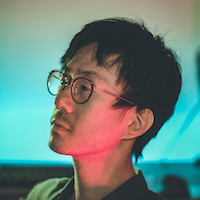
Takuya Matsuyama is a solo developer based in Osaka, Japan. He has been running Inkdrop , a Markdown note-taking app, for over nine years. His YouTube channel devaslife has 200k+ subscribers watching his development workflows. He shares everything on his blog at devas.life .
Takuya built an MCP server for Inkdrop that lets Claude Code automatically write development journals as he works. No manual logging. No interrupting flow state. Just continuous documentation that happens in the background.
Background
- Completed a Master’s degree at Nara Institute of Science and Technology (2010)
- Built Inkdrop in 2016, now generating $300k+ lifetime revenue
- Works as a freelance full-stack developer alongside his indie product
- Creates developer workflow content on YouTube since 2018
- Father of two, works from home in Osaka
His setup runs on neovim, tmux, and the terminal. Claude Code fits naturally because it operates as a CLI tool.
The Problem with Agentic Speed
When AI agents handle implementation, work moves faster than your brain can track. Takuya noticed he would finish sessions with no clear memory of what got done.
From his blog:
“When you’re in the vibe-coding zone, things progress so fast that you easily forget what you worked on.”
Manual journaling breaks flow. Automated journaling solves this.
The MCP Integration
Takuya built an MCP server that exposes Inkdrop’s note database to Claude. The server is published as an npm package with these tools:
| Tool | Function |
|---|---|
read-note | Retrieve complete note contents by ID |
list-notes | List notes in a notebook with filtering |
create-note | Create new notes in specified notebooks |
update-note | Modify existing note content |
Setup requires Inkdrop’s local HTTP server running, then adding the MCP configuration to Claude Code.
The Journaling Workflow
The workflow uses a CLAUDE.md file that instructs Claude to log every task completion. Each journal entry captures:
- Task prompt received
- What was accomplished
- Approach used
- Challenges encountered
- Suggested improvements
Claude updates the same journal note throughout a session. One continuous record instead of scattered entries.
The Bullet Train Analogy
Takuya compares AI coding to Japan’s Shinkansen: fast for popular destinations but imprecise for specific stops. You still need “local trains” (manual coding) to reach exact requirements.
This means:
- Code review becomes the new bottleneck
- AI handles execution, humans handle strategy
- Boilerplate and migrations are ideal use cases
- Novel implementations still need human craftsmanship
His rule: treat Claude as a helper, not a lead developer.
Best Use Cases
Takuya found Claude Code most effective for:
- Boilerplate generation — scaffolding and repetitive patterns
- Legacy modernization — migrating deprecated dependencies
- Small automation — scripts and one-off tools
- Tedious refactoring — work nobody wants to write manually
He freed mental capacity by offloading boring tasks. The result: development became fun again.
Key Takeaways
| Principle | Implementation |
|---|---|
| Automate documentation | MCP server writes journals during work |
| Preserve flow state | No manual logging interrupts |
| Define clear boundaries | AI executes, humans decide |
| Match task to tool | Use AI for boilerplate, not novel code |
| One session, one note | Continuous updates instead of fragments |
Getting Started
- Install Inkdrop and enable the local HTTP server
- Install the MCP server:
npm install -g @inkdropapp/mcp-server - Add configuration to
~/.config/claude/claude_desktop_config.json - Create a
CLAUDE.mdwith journaling instructions - Start a session and watch the journal populate
The MCP server source is available on GitHub .
Links
- craftz.dog — Homepage
- devas.life — Blog and newsletter
- Inkdrop — Markdown note app
- Inkdrop MCP Server — GitHub
- YouTube: devaslife — Workflow videos
- GitHub: @craftzdog — Source code
- Uses page — Tools and equipment